

Don’t fall for these five types of email scams
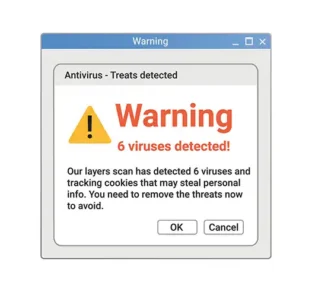 If you ever see a message like this, it’s a scam.
Photo by Pixabay

A few months ago, I received an email from Geek Squad about a renewal of a membership there that I never purchased. It listed a number to call a customer support team.
Many people who receive an email informing them that they have spent $500 on a three-year membership they never signed up for would call that number. I knew better.
First, I took a closer look at the sender’s email address. It didn’t appear to be from Geek Squad at all; it was from a Gmail address.
Next, I checked with my credit card company. To my relief, there was no $500 charge from Geek Squad. The email was a scam.
What would have happened had I called the number? Some scammers coerce people into granting them access to their computer. Once they’re in, they can steal your passwords, bank information — anything and everything.
Best practices
- Check the origin of any email, text or phone call you receive.
- To verify legitimacy, call the established support number, not the one provided in the email.
- Use the internet to look up the number that called or texted you and include “scam” in the search.
- Never grant access to your computer, phone or tablet to someone on the phone, even if they say they are a customer service representative.
- Never keep your passwords in a file on your computer, phone or tablet.
Other types of scams
Though each scam varies, what all scams have in common is the pressure to pay now — or else. Here are some common ones:
Photo scams: If you receive an email about photos with a link, it’s almost always a scam. Posing as a friend, the sender usually uses stilted language. But something like “I thought you might like to take a look at them, so here are some photographs,” doesn’t sound like something a friend would say.
Take a closer look at the link. If you see .vn (Vietnam), .io (used by tech firms) or .info, it’s probably a scam. If you’re not sure, you can give your friend a call and ask.
Imposter scams: These usually purport to be someone from the IRS or Social Security. They will call your house and pressure you to pay an amount, usually with a gift card. But the IRS will never initiate contact with a phone call; the agency communicates in writing only.
Phishing scams: What is phishing? Phishing is a type of scheme scammers use to trick people into sharing private data like passwords, bank account numbers or identification codes. They do this through texts, emails or phone calls.
Remember, never give out this private information. Do not click on any of their links or attachments, which can download a virus on your computer.
Your computer is infected: Sometimes a window will pop up on your computer with a dire warning: Your computer is infected!
These are always scams. Don’t click the link. Don’t call the number. Just click on the x in the corner of the window to exit the pop-up box. And then, in your computer’s settings, disable pop-up boxes.
Free help evaluating scams
AARP Fraud Watch is a free public service that helps people spot and report scams. It’s not just available to members; the general public can use the website and toll-free number.
If you suspect a scam and need help evaluating it, call (877) 908-3360 Monday through Friday from 8 a.m. to 8 p.m.
Another way to check out scams is the website scamwise.com. You can copy and paste the email or image into the website and get an answer quickly.
We can help each other. If you see a scam or if you’re scammed, report it. You can and should report scams to the Federal Trade Commission at reportfraud.ftc.gov. You can also report them to the Better Business Bureau.
Marshall Presser will give presentations about scams at The Grandview and Chevy Chase at Home this fall. Contact him at dont.be.a.scam.victim@gmail.com.
Money 2026
#Travel Tips #Retirement #Medigap #The Savings Game #Medicare #Love After 50 #Savvy Senior